Notion template by DigiMaster
ADHD Life Planner: one calm place for your whole day
A ready-to-use Notion template that brings your tasks, schedule, goals, habits, reminders, mood check-ins and resources together in one organised, flexible workspace.
US$14.99Digital Notion template
Checkout and delivery are handled by Gumroad. You add your copy of the template to your own Notion workspace.
For busy people who want calm structureSee the day, the week and the bigger goals without juggling five apps.
For anyone who finds plain to-do apps overwhelmingTasks live next to your schedule, habits and mood, so nothing floats around on its own.
For people who want one flexible Notion spaceEverything in a single dashboard you can reshape as your routine changes.
The dashboard
Everything in view, nothing shouting for attention
The planner opens on one dashboard. Reminders and today's mood sit on the left; Tasks, Personal Schedule, Goals & Progress and Resources & Tools are one click away on the right.
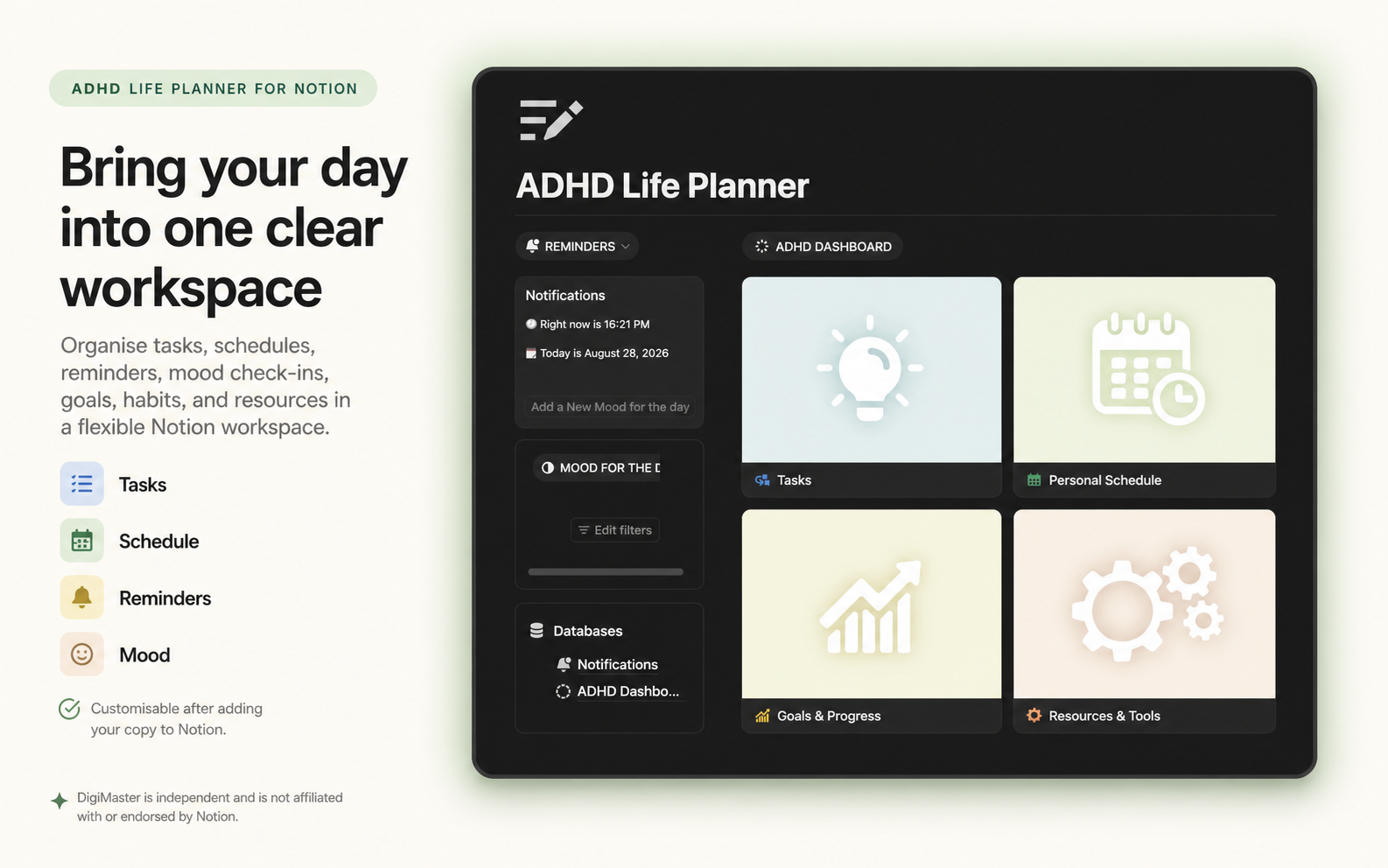
Reminders panel
Shows the current time and date, and prompts you to add a mood entry for the day.
Four main areas
Tasks, Personal Schedule, Goals & Progress, and Resources & Tools, each on its own tile.
Built on Notion databases
The Notifications and dashboard databases are listed on the page, so you can filter, sort and extend them.
What's inside
Seven parts of your day, one template
Each area is a section of the same Notion workspace, so you can move between them without losing your place.
Tasks
Capture everything in one list, then work from what matters today instead of the whole backlog.
Personal schedule
Plan your day and week in the same space as your tasks, so time and to-dos line up.
Goals & progress
Keep bigger goals visible and note progress as you go, without a separate tracker.
Habits
Track the routines you want to keep, right alongside the day they belong to.
Reminders
A notifications panel on the dashboard shows the current time and date and nudges you to check in.
Mood tracking
Add a mood for the day in a couple of clicks and look back over how the week felt.
Resources & tools
A home for the links, notes and tools you keep reaching for, so they stop living in browser tabs.
Make it yours
It's a normal Notion template: rename sections, change views, add properties or remove what you don't need.
How it works
From checkout to a planned day in four steps
Buy on Gumroad
Pay US$14.99 through Gumroad's secure checkout. Gumroad handles payment and delivery of the template.
Add your copy to Notion
Open the template link you receive and duplicate it into your own Notion workspace. You need a Notion account.
Fill in today
Add a few tasks, block out your schedule and log a mood for the day from the dashboard.
Shape it to your routine
Rename sections, adjust views and add habits or resources as your week settles into a rhythm.
See a sample day
How the sections fit together across a day
Illustrative example, written in words. Not a screenshot.
Open the dashboard
- Glance at the Reminders panel: today's date and time are already there.
- Add a mood for the day.
- Pick the three tasks that matter most.
Work from the schedule
- Check Personal Schedule for the next block.
- Tick off a task, move anything that slipped.
Keep useful things close
- Drop a link or note into Resources & Tools instead of leaving a tab open.
- Mark a habit done.
Close the day
- Note progress on a goal in Goals & Progress.
- Look at tomorrow's schedule so the morning starts already planned.
This walk-through only uses sections that exist in the template. How much of it you use, and in what order, is up to you.
FAQ
Quick answers
What exactly is the ADHD Life Planner?
A ready-to-use Notion template for organising tasks, schedules, goals, habits, reminders, mood tracking and resources in one workspace. It is a planning and organisation tool, not medical advice, diagnosis or treatment.
Do I need Notion?
Yes. The template runs inside Notion, so you need a Notion account to add your copy and use it.
What do I get after paying?
Gumroad delivers access to the template. You open the link and duplicate the planner into your own Notion workspace, where it is yours to use and edit.
Can I change or add sections?
Yes. Once it is in your workspace it behaves like any other Notion page: rename sections, change database views, add properties or remove what you don't use.
Which languages is the site available in?
English is the default. French and Spanish versions of the site can be selected from the language switcher in the header.
Is DigiMaster part of Notion?
No. DigiMaster is an independent creator and is not affiliated with or endorsed by Notion.
How do I get help?
Email support@
Ready when you are
Bring your day into one clear workspace
Buy the ADHD Life Planner, add your copy to Notion, and start tomorrow with tasks, schedule and mood all on one page.
US$14.99ADHD Life Planner · Notion template
Buy on Gumroad- Checkout and delivery by Gumroad
- Works in your own Notion workspace
- Questions: support@
shopdigimaster .com